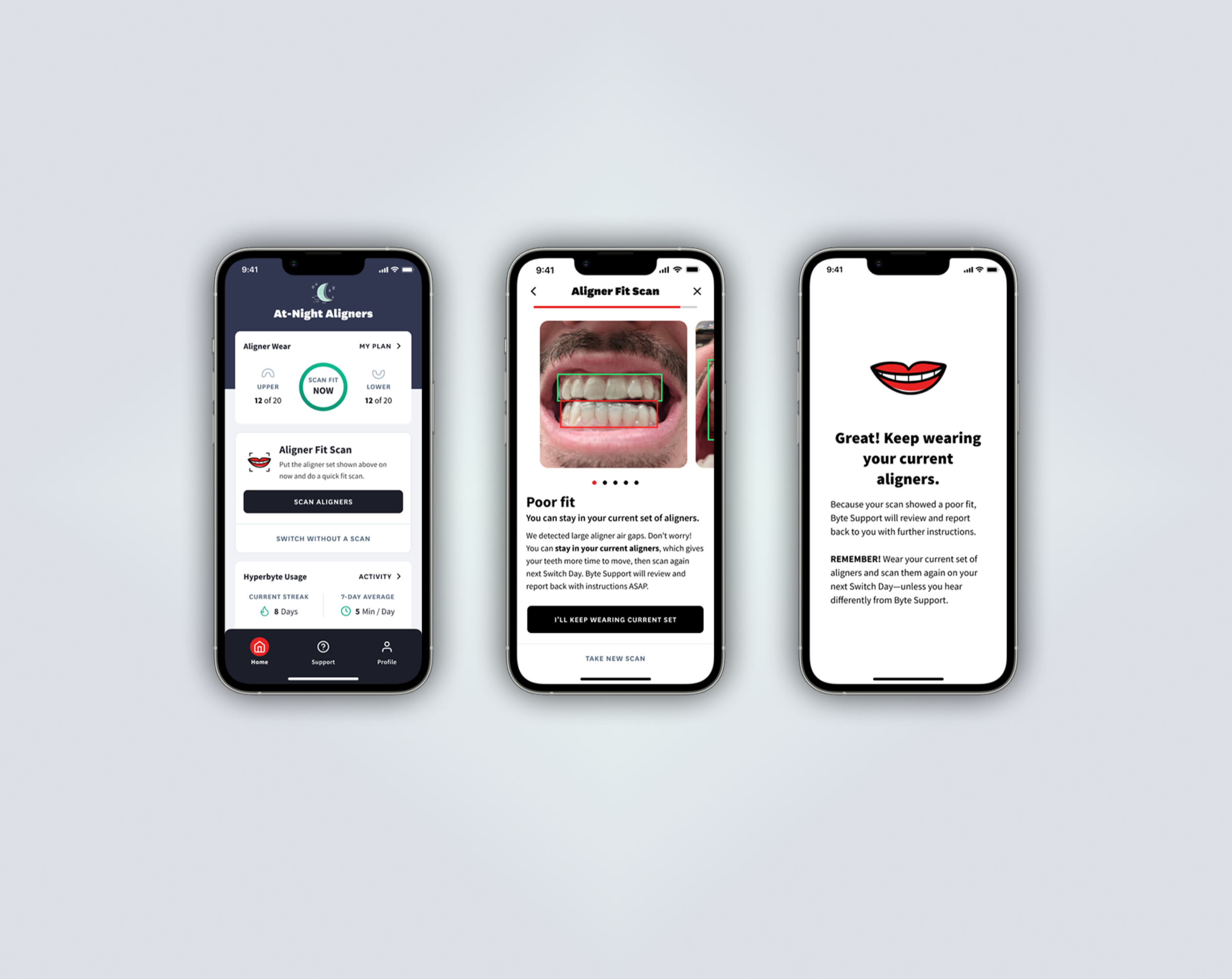
Byte AI Aligner Fit Scan product interface

Byte AI Aligner Fit Scan

Navigated FDA 510(k) validation for an AI diagnostic feature—coordinating clinical, regulatory, and ML teams from concept through validation-ready.

Overview

Byte's standard clear aligner prescription is 7 days per tray. After a week, the app reminds users to switch to the next tray, incrementally shifting teeth toward a straighter smile. But teeth rarely comply 100% of the time.

Users were following the plan, but we had no process to verify if aligners fit well enough to switch, and users didn't always trust their own judgment. Yet switching prematurely can lead to tooth or gum injury, damaged aligners, and delayed treatment.

What if we could green-light good-fitting aligners after their prescribed wear time, and escalate poor-fitting cases to our clinical team?

I led the product strategy for an ML computer vision feature that would deliver instant fit assessments, giving users confidence as they progressed through treatment and improving their outcomes.
THE CHALLENGE

DTC Disruption Meets Clinical Reality

Byte disrupted the clear aligner industry by going direct-to-consumer: straighten your teeth from home without visiting a dentist's office. This required workflows and SLAs to deliver treatment feedback remotely.

But the existing process had gaps:

Monthly Check-ins caught fit issues too many trays too late. Yet ad hoc support couldn't scale to review fit photos every week.

Meanwhile, users switching every 7 days (as instructed!) were potentially switching prematurely, before their teeth had fully settled into the current tray. Premature switching could lead to clinical escalations, increased support volume, delayed treatment, and user churn. We needed a way to assess fit at the moment of decision, not weeks later.

AI MODEL TRAINING

Teaching the Model What "Good" Looks Like

We branded it as AI, but technically this was computer vision. The model needed to learn visual patterns that indicate fit issues from thousands of labeled images. I orchestrated the feedback loop that created that training data.

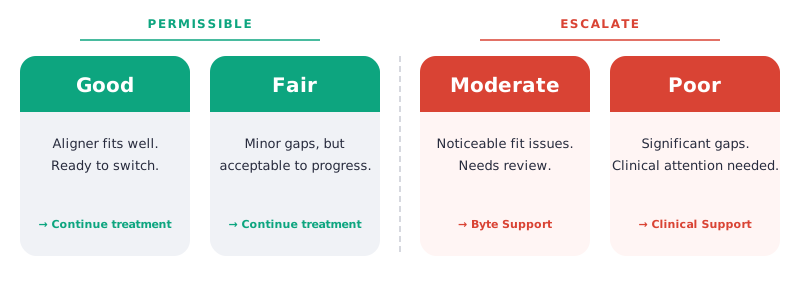
Working with clinical and ML engineering, we defined a 4-class labeling system for case routing. This deviated from existing support tiers, but it created a common language across all departments for defining fit.

4-class labeling system: Good and Fair are permissible, Moderate escalates to Byte Support, Poor escalates to Clinical Support
Trained on nearly 20,000 photos, the model achieved 0 false positives at the extreme ends. A good fit was never classified as poor, and vice versa.

DESIGN

From Concept to Wireframes

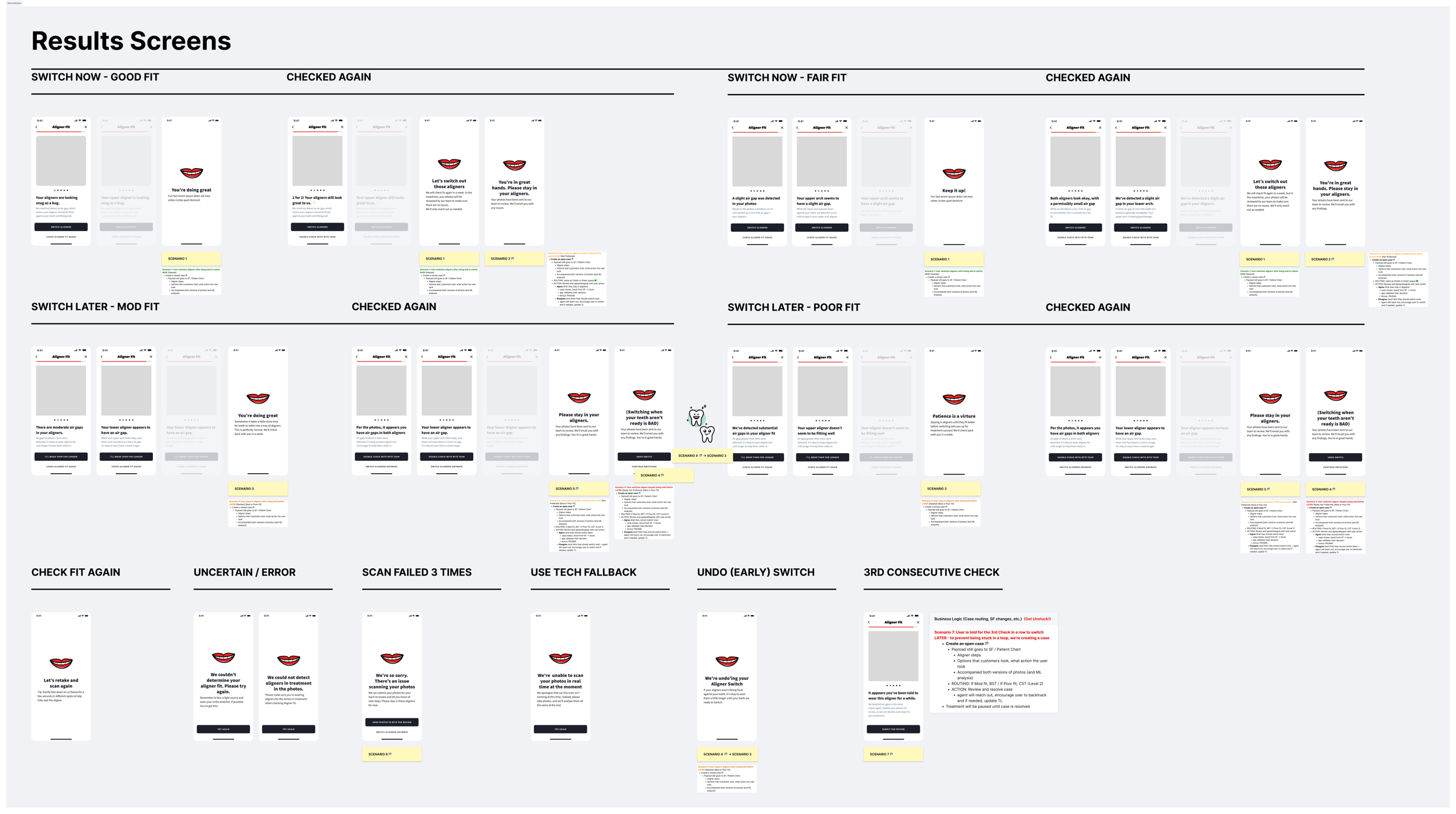
We didn't have a Product Designer at the time, so I dusted off my UX Designer skills, rolled up my sleeves, and worked out the user flows and designed lo-fi wireframes myself. The challenge was making sure I didn't miss any scenario.

To make matters more complicated, aligner fit isn't binary. One arch can have a good fit while the other has a bad fit. And yet, it doesn't hurt to wear a good-fitting aligner a bit longer, but it's definitely bad to rush ahead if the current aligner isn't fitting well. I started by fleshing out the possibilities for every combination, mapping clear next steps for each one. Then I stress tested these with clinical stakeholders.

Early wireframes exploring the fit assessment flow
My early lo-fi wireframes to flesh out the fit assessment screens, factoring in edge cases, fallbacks, and retakes.

The copy was just as important as the layout. Because this was a clinical assessment, we couldn't use definitive language. We used softer framing like "could" or "may", and qualifiers like "based on what we can see in the photos." The goal was to give users useful guidance without overstating what the model could determine.

As a result of looping in engineering, clinical, UX copywriting, and support, we found a few spots to consolidate flows without compromising on the experience.

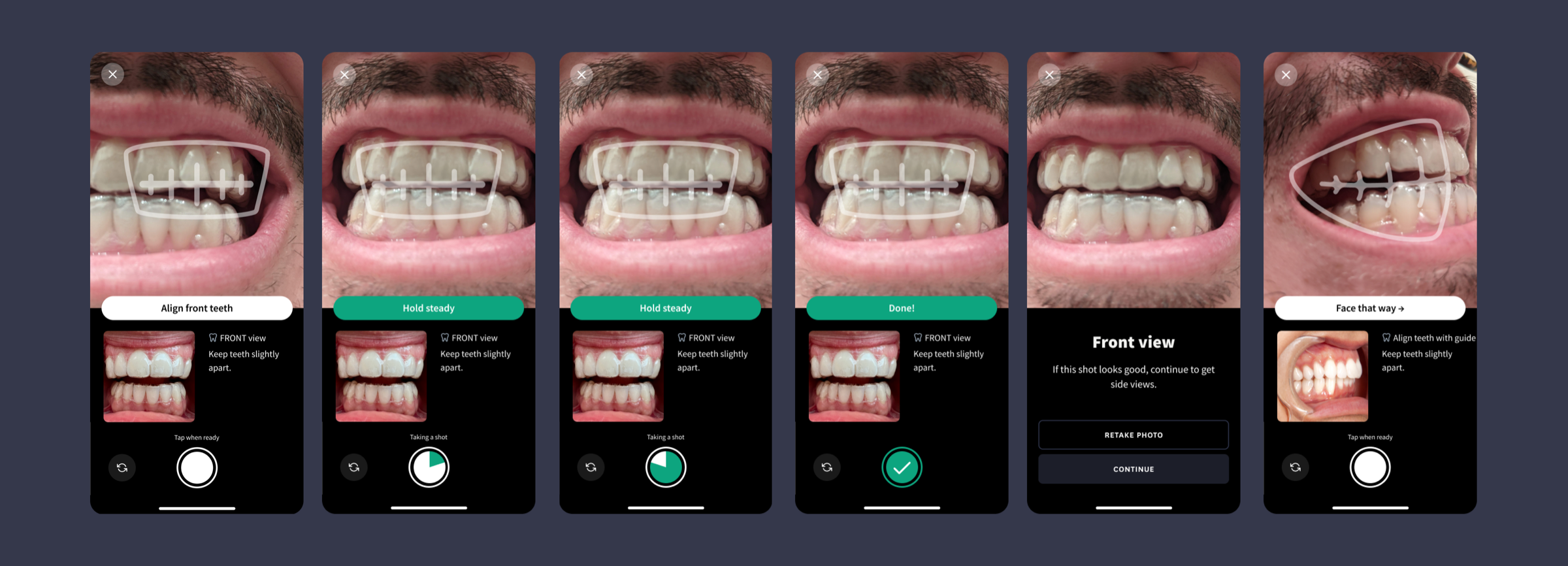
We also rethought the camera experience. Instead of asking users to manually capture photos of their teeth, we designed the camera to work like a mobile check deposit: align your teeth to on-screen guides and the app captures automatically. This eliminated the guesswork that led to unusable photos in the Check-in flow.

Camera experience with on-screen alignment guides
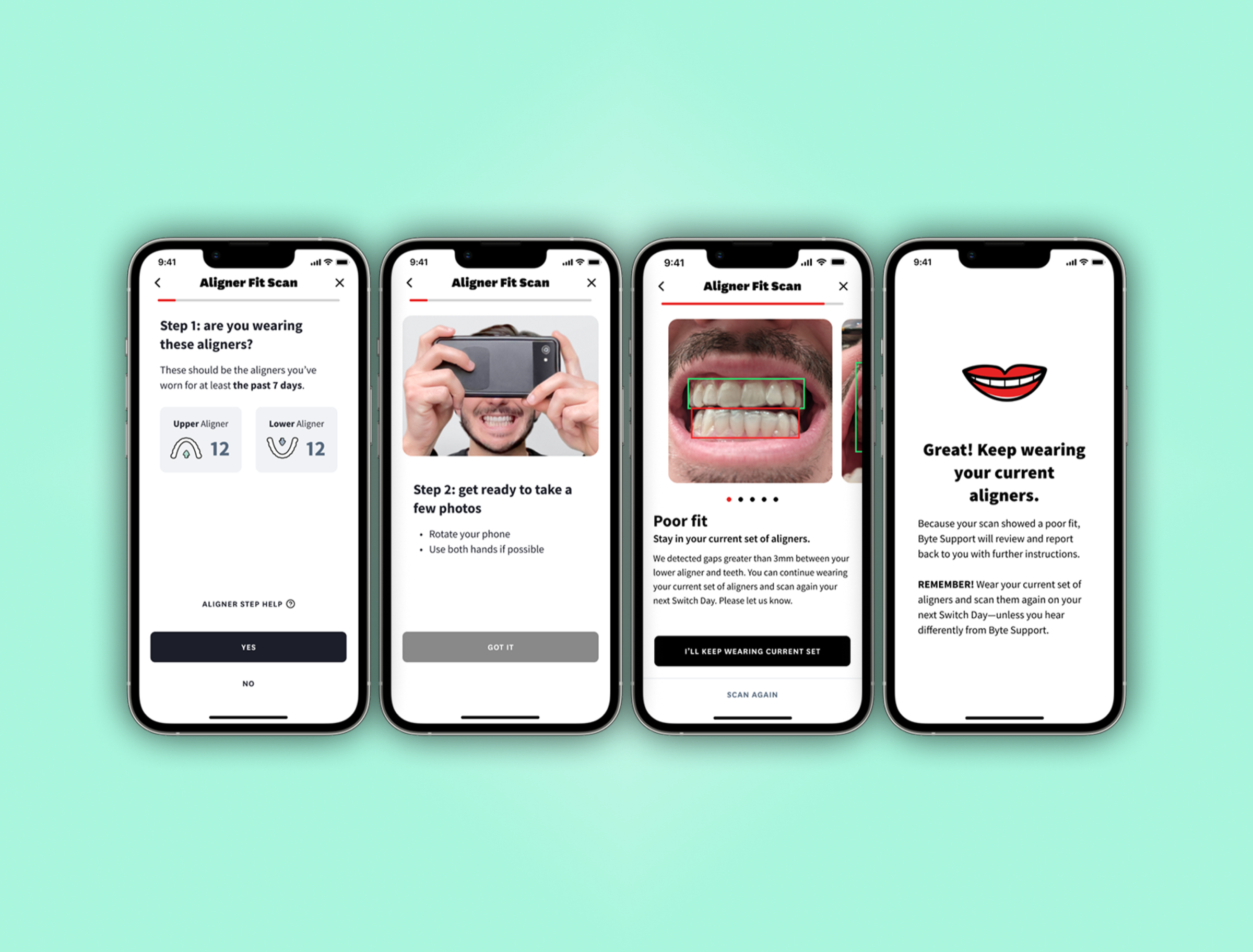
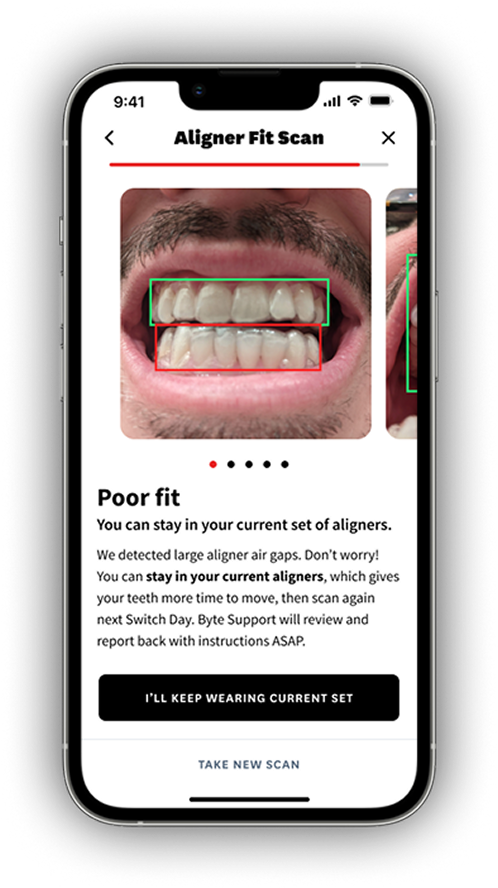
The final AI Aligner Fit Scan experience

USABILITY TESTING

Validating with Users

I'd established a continuous discovery practiceSee how we built a weekly discovery practice at Byte → at Byte, which meant we weren't waiting until the end to test our assumptions. With every iteration of the design, we put it in front of real users.

The feedback was clear: 19 out of 20 users were enthusiastic about the concept and said they would use it. It's worth noting that the outlier said they feel like after a few trays of learning what felt right, they wouldn't need the validation every time, but acknowledged that this is a very helpful feature. It delivers the confidence users want in their aligner fit decisions.

"Having the app be able to tell you it's not fitting the best is really helpful. That is like solving all the problems I think I've ever had with the aligner system."
— Byte user during usability testing

COMPLIANCE & REGULATION

A Phased Approach

Any software that diagnoses, treats, or prevents disease is regulated by the FDA. The AI Aligner Fit Scan would be telling users whether their aligners fit well enough to progress treatment AKA a clinical determination.

The regulatory team advised filing for FDA 510(k) clearance, which involves demonstrating that the device is safe and effective. For an AI/ML device, this meant documenting training data, software specs, validation methodology, and clinical accuracy thresholds. It's a rigorous process that can take 8–12 months.

When I learned the timeline, I proposed a pivot. I showed regulatory and legal a lo-fi wireframe of a non-AI version—dubbed Aligner Fit Fotos—that we could build and ship while the 510(k) ran in parallel.

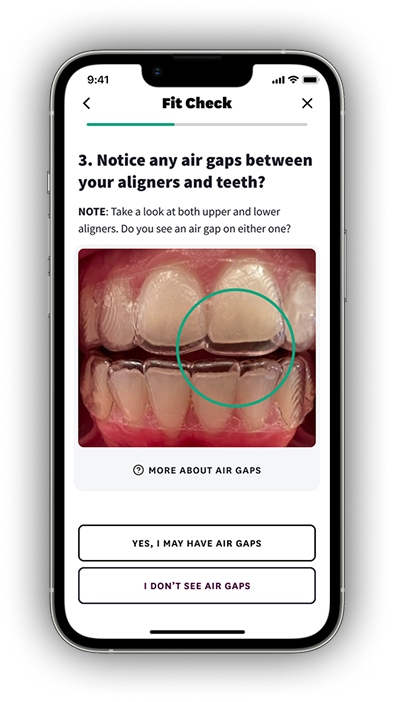
Aligner Fit Fotos (Phase 1)

Instead of switching on autopilot, users learn what good and poor fit looks like through reference photos, building the habit of checking fit before every switch.

Aligner Fit Fotos experience

AI Aligner Fit Scan (Phase 2)

ML-powered computer vision delivers an instant fit assessment — good fits are cleared on the spot, poor fits are escalated to clinical review automatically.

AI Aligner Fit Scan experience

In the Interim: Check-in ImprovementsSee how we iteratively improved the Check-in experience →

While AFF and AFS were in development, users still relied on the monthly Check-in as the primary clinical touchpoint. We couldn't wait, so we iteratively shipped small improvements to reduce friction and keep completion rates up.

ROLLOUT STRATEGY

Changing Two Habits at Once

Shipping the feature was only half the challenge. We were asking users to change two behaviors simultaneously: stop switching aligners on autopilot every 7 days, and start checking fit before every switch instead of waiting for a monthly Check-in.

That's a big ask for users already mid-treatment with established routines. So we designed a graduated rollout. We'd start with a beta group of brand new users — people who hadn't formed habits yet and would learn this workflow from day one. This also let us stress-test support SLAs and escalation queues at a manageable scale before opening the floodgates.

From there, the plan was to make it the default for all new users, then gradually introduce it to existing users in cohorts. AFS would follow a similar graduated rollout, but for a different reason: evaluating ML accuracy and confidence thresholds in production before scaling to the full user base.

RESULTS

Validation-Ready

Organizational restructuring paused the initiative before full launch, but both versions reached validation-ready status, and user research validated our approach.

REFLECTION

What I Learned

What I learned: The hardest part of AI products isn't the model. It's encoding clinical expertise into data the model can learn from. The feedback loop between domain experts and ML engineers is where the real product work happens.

I also learned how to interpret confidence scores and work with ML and clinical teams to determine what "good enough" confidence looks like. That threshold isn't a technical decision. It's a product decision with clinical implications.

What I'd do differently: Loop in regulatory even earlier. The 510(k) timeline wasn't a surprise to them. It was only a surprise to us. Earlier alignment would have shaped our roadmap from the start.

Other projects